Header

Image Map

Monday, September 26, 2016

Volunteer Organization Made Easy

Do you want to take your students on a field trip but dread volunteer sign ups? Did your last party or celebration have 15 desserts and 1 side dish? Do you want an easy way to display class wish lists and ensure you get what you want? Sign Up Genius is the answer!

From field trips to celebration parties, organizing volunteers can be a stressful experience. Luckily, there's a solution for you! Check out this post for a music teacher's favorite tool.

Pick a Theme That Works
Sign up Genius offers countless themes for your sign ups! I love this feature. The themes are neat and clean. Volunteers can easily see what kind of event they're signing up for just from the picture. 


All Dates in One Place
One great feature of Sign Up Genius is that if you have a recurring event, such as required chaperones at a rehearsal or event, you can put all the dates on one sign up. Volunteers can easily see where there's a need and what works best for their schedule. You can also keep track of who has signed up in real time. You no longer have the stress of keeping track no of paper slips that often come in past the due date.


Send Reminders
One of my favorite features is the reminder feature. Sign Up Genius will automatically send out a reminder email to your chaperones for upcoming events. This takes the stress out of sending out reminder emails or text messages.


I Love Sign Up Genius!
This website has saved me so much time and agony! From signing up ushers for concerts to organizing post concert celebrations, this has streamlined volunteer organization. It is easy to set up, looks clean, and best of all, it's FREE to use!
post signature

Thursday, September 15, 2016

Obwisana - A Singing and Passing Game from Ghana

Wednesday, August 3, 2016

5 TED Talks for Music Teachers

I love TED talks! They are just long enough to fit a substantial amount of information and short enough to watch in one sitting. These are a few of my favorite TED talks to inspire music teachers all around!

As music teachers, sometimes we need a little inspiration! These 5 TED talks will give you just that. From serious questions to fun solutions, these TED talks are sure to inspire and excite!


Eric Whitacre - A Virtual Choir 2,000 Voices Strong


Technology is transforming so quickly. It is amazing what happens when you combine technology and music. This TED talk features Eric Whitacre talking about his virtual choir.

Stefon Harris - There Are No Mistakes on the Bandstand


Sometimes as music educators, we can get hung up on perfection and can beat ourselves up over mistakes. Mistakes are only often perceived as mistakes because of the way we react to them. It's a good lesson for us as teachers and for our students as well.

Ken Robinson - Do Schools Kill Creativity?


There is certainly a reason why this is one of the most popular TED talks of all time. As music educators, we value creativity. Ken Robinson is a wonderful advocate for nurturing students' creativity.

Rita Pierson - Every Kid Needs A Champion


This is my absolute all time favorite education related TED talk. Rita Pierson reminds us as educators that it is important to believe in our students and foster positive relationships with them.

TED Staff - It's TED, The Musical!

For those of you who love musicals, check out this TED talk! This one is just for fun. Sometimes you need a little laugh after a long school day!


post signature

Friday, July 22, 2016

5 Name Games for Back to School in the Music Classroom

Thursday, March 24, 2016

Gamify Your Music Lessons and Gather Assessment Data Using Kahoot

Gone are the days of boring review sessions. Turn your classroom into a gameshow using Kahoot! 


What is Kahoot?
Kahoot is a game-based learning website for all ages. A teacher creates a quiz or "kahoot" containing a series of questions with 2-4 answers. You can also browse the public Kahoot database to see if the material you want to review has been made by another teacher.

What do I need to use Kahoot?
The teacher will need a device that connects to the internet and a way to project the screen on that device. Students will need a device that connects to the internet. Devices include smart phones, tablets, computers, etc.

How does Kahoot work?
The teacher will login and "play" the kahoot they are planning to use in the lesson. Students will need to go to kahoot.it (different than the teacher website) and enter the game pin displayed on the screen. Once all of your students have joined, the teacher begins the game.


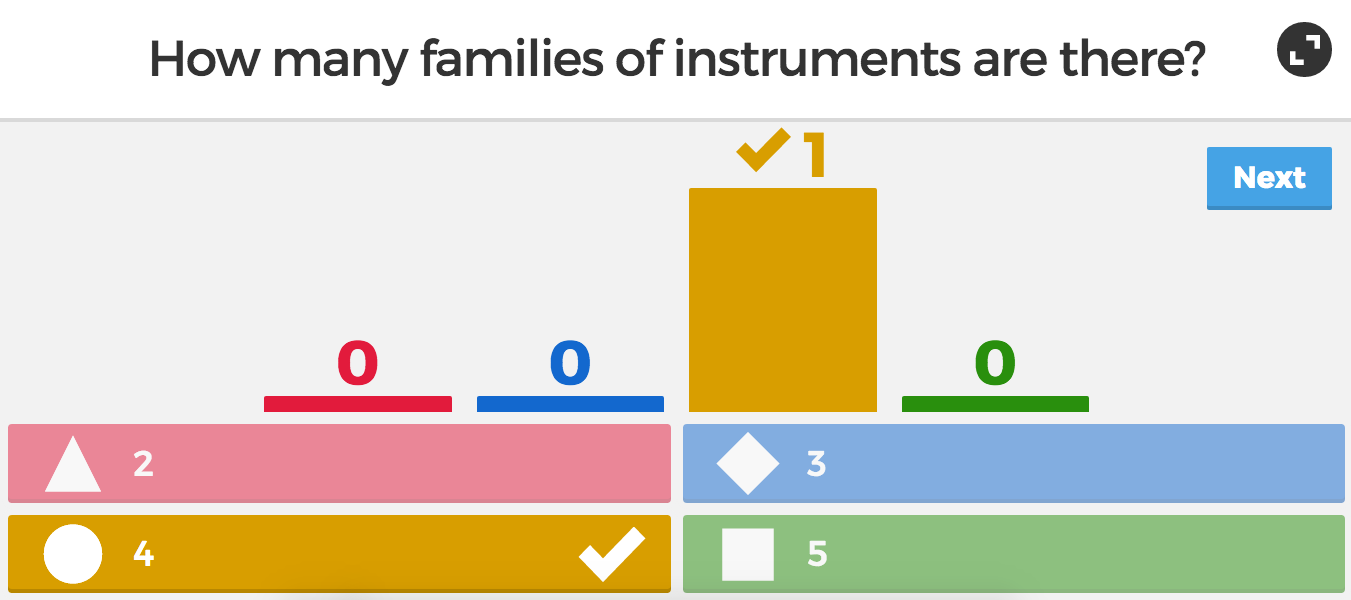
The first question will appear. Students will have several moments to read the question before the answers are displayed. Students select answers by choosing the corresponding shape or by color. The quicker a student responds with a correct answer, the more points they get. 


After the end of each round, the correct answer is displayed along with the amount of people that chose each answer. Following that, the leader board comes up, which encourages students in friendly competition.


How can I use Kahoot to assess students?
The most awesome feature of Kahoot might be it's ability to assess data. At the end of a game play, the teacher will reach a screen that gives the option to download the results. You have the option to download as an Excel file or download straight to Google Drive.


When you open the file, you get an analysis of how each student did overall and how they did on each question. A green mark indicates a correct answer, red indicates incorrect answer. You could use this data as a grade or as a way to inform your teaching.


Bottom line, students learn while having fun and you get the data you need to assess!

post signature

Thursday, August 20, 2015

Need a Pencil?

Monday, July 20, 2015

Job Search and Interview Tips for Music Teachers